Setup
Unique team tokens will be provided to each team prior to range open (example token: 5cfefcf8549395ac3aa5a6322cbb5b8a). These tokens are used to authenticate credential downloads, flag submssions, and name changes.
Once the range opens, the API endpoint http://187.127.71.238:8000/teamdata/{team_token}/rangedata.zip will open. The downloaded zip will contain all your team's WireGuard VPN files, in addition to a creds.txt file which contains the credentials to each of your team's vulnboxes.
Network
Each service is hosted on its own vulnbox on the 10.100.0.0/15 network. Each team is assigned a /24 subnet, with the third octet corresponding to their team ID. Therefore, the IP for each vulnbox takes the form of 10.100.T.S, where T is the team ID and S is the service ID.
All traffic is source NATed through the VPN server (10.101.0.1), including checker traffic.
All vulnboxes are running Alpine Linux. Any service source code is stored in /service. Services are usually run inside docker containers on the vulnboxes.
Flag Format
Flag regex: [A-Z0-9]{31}=
Example flag:
XFWEC8CI1OP1DNBD8CJNUB22VIQ22T2=
FlagIDs: (Vary per service. Usually usernames or user IDs associated with the service).
Scoreboard
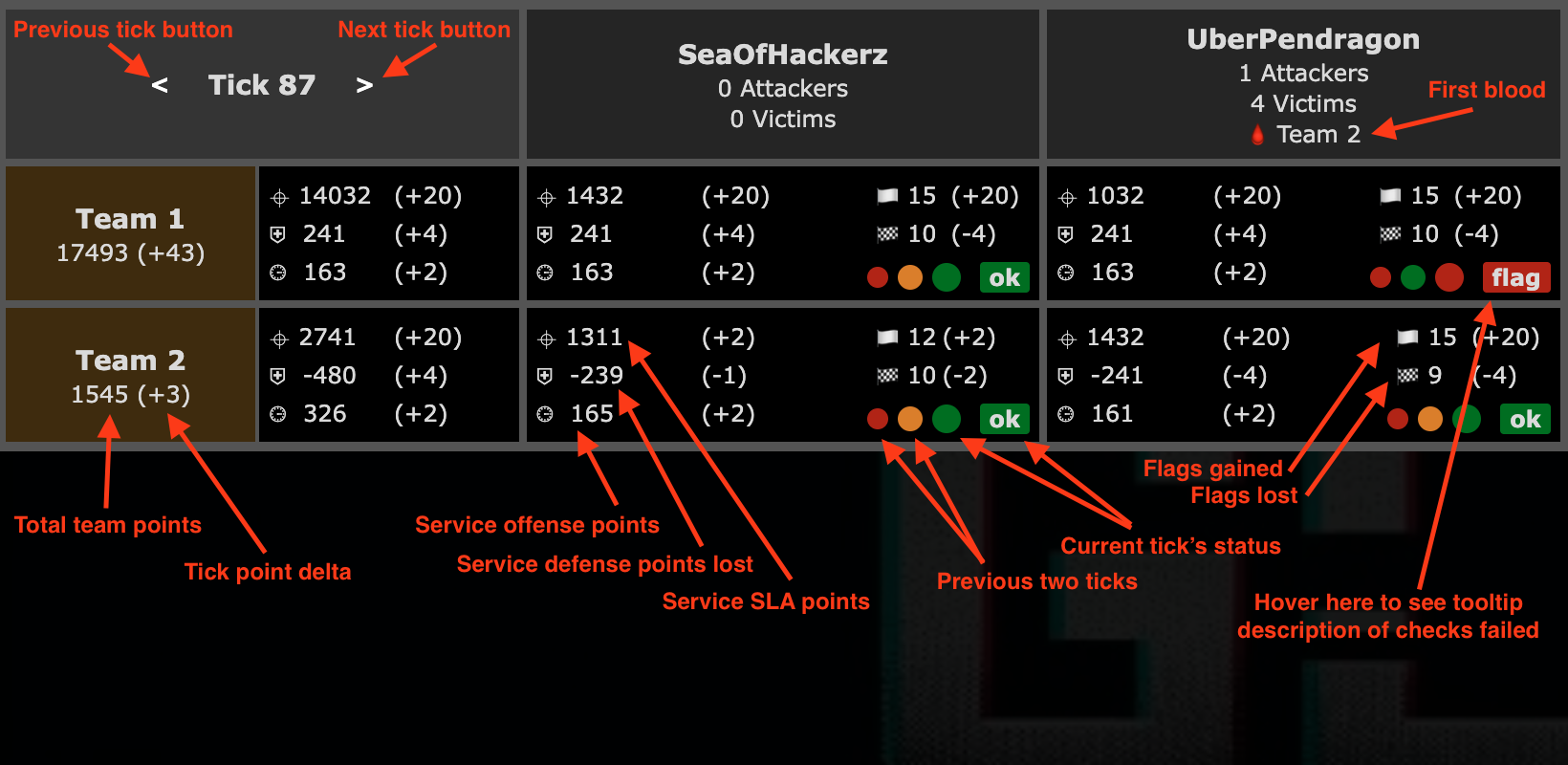
The scoreboard is accessible at http://187.127.71.238
API
API is hosted at http://187.127.71.238:8000 from outside the range, or http://10.101.0.2:80 from inside the range. Full OpenAPI documentation is at /docs.
To submit flags POST /steal with URL parameters token and flag. Below is an example curl command:
curl -X POST "http://187.127.71.238:8000/steal?token=<token>&flag=<flag>"
To change your team name on the scoreboard, POST /rename with URL parameters token and name. Name changes will only apply to future ticks. Below is an example curl command:
curl -X POST "http://187.127.71.238:8000/rename?token=<token>&name=<name>"
To get a list of targets, GET /hosts. Example response:
[
  {
    "service_name": "simple",
    "service_id": 1,
    "team_id": 1,
    "ip": "10.100.1.1"
  },
  {
    "service_name": "simple",
    "service_id": 1,
    "team_id": 2,
    "ip": "10.100.2.1"
  },
  {
    "service_name": "SeaOfHackerz",
    "service_id": 2,
    "team_id": 1,
    "ip": "10.100.1.2"
  },
  {
    "service_name": "SeaOfHackerz",
    "service_id": 2,
    "team_id": 2,
    "ip": "10.100.2.2"
  }
]
To get a list of active Flag IDs, GET /flagids. Example response:
[
  {
    "service": "simple",
    "service_id": 1,
    "team_id": 1,
    "tick": 66392,
    "flag_id": "2jitycpb2euu3m8v"
  },
  {
    "service": "simple",
    "service_id": 1,
    "team_id": 1,
    "tick": 66393,
    "flag_id": "le4esae1gsp3fpqy"
  },
  {
    "service": "simple",
    "service_id": 1,
    "team_id": 2,
    "tick": 66392,
    "flag_id": "rajafpy4mlajeguz"
  },
  {
    "service": "simple",
    "service_id": 1,
    "team_id": 2,
    "tick": 66393,
    "flag_id": "s3ykbpm4mca3qu6a"
  },
  {
    "service": "SeaOfHackerz",
    "service_id": 2,
    "team_id": 1,
    "tick": 66392,
    "flag_id": "{'userId': 1153}"
  },
  {
    "service": "SeaOfHackerz",
    "service_id": 2,
    "team_id": 1,
    "tick": 66393,
    "flag_id": "{'userId': 1154}"
  },
  {
    "service": "SeaOfHackerz",
    "service_id": 2,
    "team_id": 2,
    "tick": 66392,
    "flag_id": "{'userId': 1143}"
  },
  {
    "service": "SeaOfHackerz",
    "service_id": 2,
    "team_id": 2,
    "tick": 66393,
    "flag_id": "{'userId': 1144}"
  }
]